Context is king
Whenever I show the result of a major task done with Claude Code, or present a code audit generated in minutes, the first question is always the same: “What was your prompt?”.
I share it willingly. But I always stress one thing: the prompt is the least important part of the whole chain.
In the two previous articles in this series, I shared my AI journey and raised the question of where our profession is headed. Today, we get practical: how I actually work with an LLM day to day, and what lever makes the real difference.
Context engineering: the idea that changes everything
You hear a lot about “prompt engineering”. How to craft the perfect request, the right structure, the right keywords, the right examples. There are entire courses dedicated to this, certifications, LinkedIn job titles for “prompt engineers”.
My daily experience doesn’t validate this approach. What separates a mediocre result from an excellent one is never the prompt wording. It’s the context it’s sent in.
Hence the idea of “context engineering”. The idea is straightforward: if the model has the right information at the right time, it will understand your intent even if the prompt is rough, full of typos, written like a 2 AM text message. Conversely, the most carefully crafted prompt in the world won’t produce anything useful if the model doesn’t know what you’re talking about.
It completely changes how you think about things. You stop asking “how do I phrase my request?” and start asking “does the model have everything it needs to understand what I want?”.
Talk to the LLM like a new team member
The breakthrough for me was treating the LLM like a developer who just joined the team. Someone technically skilled, but who knows nothing about the project.
When a new dev joins, nobody throws a Jira ticket at them saying “here, do this”. You take the time. You explain the business context, the project architecture, the team’s conventions, the known gotchas. You show where to find the docs, which files matter, how to run the tests.
With Claude Code, it’s the same.
Before starting any development work, I set the stage. I explain the functional domain, what we’re trying to solve, and most importantly why. I don’t just hand over a piece of code to modify. I provide the business context around it.
Claude Code has concrete mechanisms for this. By typing @, you get a file name search that lets you reference any project file directly in the prompt. I use it to point to key files: technical documentation, ADR (Architecture Decision Records), functional tests that describe expected behavior.
On my current project, we use Behat, and Gherkin scenarios are a goldmine for the model. It reads “Given I create a user / When I update table X / Then the status should be active” and immediately understands the business domain without me having to write a specification.
I also share the names of classes I think are relevant, existing services, project-specific conventions. The more business context the model has, the less prompt wording matters.
Plan mode: where everything comes together

If I could keep only one tool in Claude Code, it would be plan mode.
The idea: before writing a single line of code, you switch to a mode dedicated to planning (Shift+Tab to toggle). The model focuses all its energy on exploring the project and understanding dependencies before laying out a structured implementation plan. No code at this stage. Just thinking.
This is where the context gets loaded. I explain the requirement in detail, reference important files with @, point to the relevant unit and functional tests. The model reads, analyzes, and goes off on its own to explore related files I hadn’t even thought of.
The real value of plan mode is the dialogue it creates. The model asks questions, challenges my decisions, spots ambiguities I’d missed. On large tickets, I easily spend an hour iterating with it. As long as the plan doesn’t fully convince me, I keep pushing back. This isn’t wasted time. Far from it. An hour invested in planning is potentially a full day of aimless development saved.
Once the plan is validated, Claude Code offers to start a fresh session. It might seem counterintuitive to wipe everything after spending an hour discussing. But the plan is saved with all the necessary information, and a clean context frees all available tokens for the implementation.
Managing the context window
An LLM has no memory in the traditional sense. Its “working memory” is the context window: a fixed-size space that holds everything you send it. Persistent instructions (CLAUDE.md), command and skill definitions, MCP tools, the full conversation history.
When this window fills up, the model can no longer work. You need to clean it up to continue. Learning to manage this resource is just as important as knowing how to set up good initial context.
Claude Code provides several commands for this, and they punctuate my workdays.
/compact summarizes the conversation to free up space. The model condenses the exchanges, keeps what matters, and continues with a leaner context. Useful detail: the command accepts optional instructions (/compact keep the implementation plan and modified files) to guide what the model should preserve during the summary. By default, this compaction triggers automatically when the context hits a certain threshold. So I disabled the automatic trigger (via the autoCompact setting in Claude Code settings). I prefer choosing the right moment myself, because timing matters: compacting between two distinct tasks is fine. Compacting in the middle of a complex implementation means losing critical details.
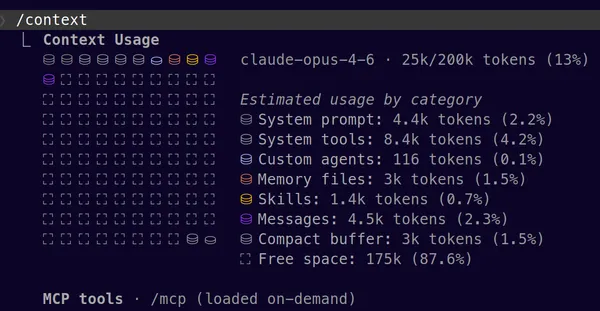
To avoid being caught off guard, I permanently display the context usage percentage via the Claude Code status line. When I’m approaching 90%, I know it’s time to compact or start fresh. Launching a task with a nearly full context guarantees the model won’t be able to finish. For a more detailed diagnosis, /context shows what occupies the window and how much each element consumes.
/rewind lets you go back in the conversation. If the model heads in the wrong direction, instead of correcting and piling up useless context, I rewind. The model forgets everything after that point, and the code is restored to its previous state. It’s the Ctrl+Z of AI collaboration. It’s also the escape hatch when the context is so saturated that even /compact won’t work anymore: you go back to find some breathing room.
/resume picks up a previous session with its full history. When QA comes back with changes on a feature delivered yesterday, I don’t re-explain everything from scratch. I reload the original session and the model immediately has the context.
/clear starts from zero. Essential between two completely different topics, to avoid contaminating a new task with leftovers from the previous one.
These commands, combined with plan mode, form the backbone of my daily workflow. Ultimately, mastering them taught me something: time spent managing context pays off far more than time spent polishing a prompt.
So what about the prompt?
Honestly? I put zero effort into it.
If the context is properly loaded, if plan mode has done its job, if the right files have been referenced, the prompt can be a sentence tossed off carelessly. With typos, abbreviations, mixed languages. The model gets it.
I prompt the way I think out loud. I throw out ideas in no particular order. And crucially, I leave my hesitations in the prompt as-is: “I’m not sure, I’m torn between these two approaches”, “actually maybe I’d do it this way, or maybe not”. This isn’t noise. It’s signal. The model picks up on the uncertainty and naturally digs into those areas, challenges my doubts, suggests alternatives where I’m vague.
It’s the exact opposite of classic “prompt engineering” where every word is weighed and calibrated. With good context, prompt precision becomes secondary. Intent is enough.
What’s next?
Everything I’ve described rests on a foundation I’ve barely mentioned: persistent instruction files. In Claude Code, these are CLAUDE.md files, loaded automatically with every interaction. They form the permanent base of the context — what the model knows before you’ve even said anything.
What to put in them, how to structure them, how to organize them between global and project-specific — there’s plenty to say. And that’s exactly what the next article in the series will cover.